Blog

Designing for Faceted Search

· Michael Angeles

Stephanie Lemieux discusses issues to consider when designing faceted navigation interfaces for search in the latest UIE newsletter.

Faceted search is a very popular and powerful solution when done well; it allows users to deconstruct a large set of results into bite-size pieces and navigate based on what’s important to them. But faceted search by itself is not necessarily going to make your users lives easier. You need to understand your users’ mental models (how they seek information), test your assumptions about how they will interpret your terms and categories and spend time refining your approach.

Read More...

http://www.uie.com/articles/faceted_search

In Defense of Eye Candy

· Michael Angeles

There are quite a few nice takeaways from Stephen P. Anderson's article in A List Apart, a discussion in defense of the value of visual design beyond more than just aesthetic skinning of functionality. I like this one where he flips the notion that things are enjoyable because of how they function by saying:

[T]hings that are enjoyable will be easy to use and efficient."

This is connected with the user's belief that attention to design detail is related to quality. This notion was tested by Don Norman and written about in the book Emotional Design. In it, Norman explains how our brains work:

[W]hen we are relaxed, our brains are more flexible and more likely to find workarounds to difficult problems. In contrast, when we are frustrated and tense, our brains get a sort of tunnel vision where we only see the problem in front of us.

Anderson writes that the most direct way to influence decisions or perception is through the emotions. The final point is that user experiences should integrate form and function holistically, or as Frank Lloyd Write puts it, "“form and function should be one, joined in a spiritual union.” I like that.

http://alistapart.com/articles/indefenseofeyecandy

A Discussion on User Experience Design

· Michael Angeles

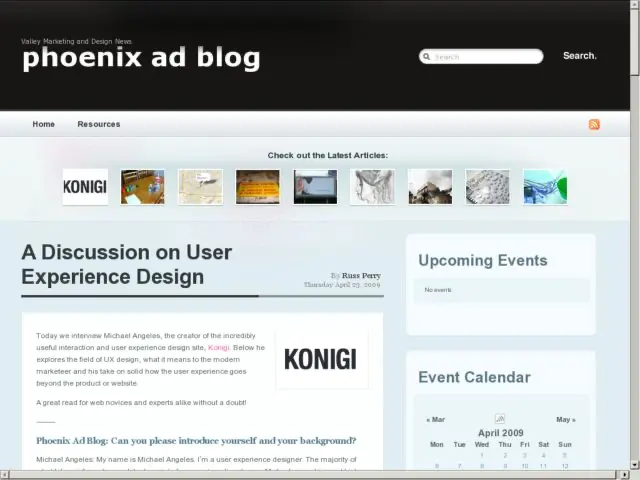
I spoke with Russ Perry at the Phoenix Ad Blog to discuss what User Experience Design might mean to graphic designers and marketing professionals, especially those not involved in the design of sites and apps.

I don't like getting caught up in the "defining the damned thing" discussions, but there you have it. Oh, and I mention Zappos, not because of their visual or interface design, per se, but about their relevance in terms of the holistic approach to user experience outside of the interface.

http://phxadblog.com/2009/04/a-discussion-on-user-experience-design/

Move beyond function towards connection

· Michael Angeles

David Malouf believes that "most successful products create a sense of connectedness between the consumer and the designer and that this connection occurs when designers balance the pull towards the rational, functional, & expedient with the natural & emotional."

In his article on Johnny Holland, David looks more deeply at what it means for an end-user to be connected to a product. He first looks at how art creates connection with humanity. It is the type of soulful connection that we experience in master works of art that either reach universal touch points, or resonate with us at a level that transcends pure aesthetic appreciation. David considers what it might mean to connect the user experience with the user on that kind of level.

[S]oul comes through a feeling of connectedness. The ... flick of the iPhone is more than just a great metaphor: it is a calling card. It is that random sign that is completely analog in its interpretation. No machine could have ever conceived that. Apple through almost all of their products have become expert at adding these “human” touches in their designs.

...

Great design in the end will give us something to relate to, to feel connected with, and to reinforce our humanity. Tapping that right balance between emotion and logic, chaos and control, analog and digital, is the key to this success. We can no longer rely on “form follows function”. Form has to be parallel to function, as function is growing in commodity.

I think this is a wonderful look at how function can be abstracted to create experiences that seem natural over time and have a human feel.

There are other characteristics of the experience that I think might help products bridge the gap between purely functional existence to sympathetic, connection-seeking being, by also touching elements other than the designed object or interface. Take the use of language in interfaces for example. Simply choosing the right interface to approach natural conversation without being cheeky can sometimes achieve this connection.

The point that purely providing functional products is no longer adequate for survival can't be understated. If companies want to differentiate themselves and retain loyal customers, design is what will separate all of the generic products from those that create connection with the user.

http://johnnyholland.org/magazine/2009/04/function-to-connection/
OmniGraffle 5 Keyboard Shortcuts Cheat Sheet

· Michael Angeles

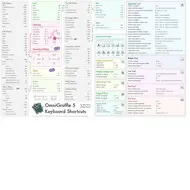
For all you Grafflers out there, Nick Finck has created a sweet single page cheat sheet illustrating OmniGraffle's numerous and well hidden keyboard shortcuts. Nick took the multi-page Help file provided by Omni and consolidated all of the tips into a single tabloid poster that you can print and stick on your wall to make life easier. More info at the OmniMouth.

Download the graffle directly here or from the OmniGraffle Extras page.

http://blog.omnigroup.com/2009/04/17/a-cheat-sheet-of-sorts-for-omnigraffle-5/

OmniGraffle Tip: Change Keyboard Shortcuts

· Michael Angeles

Here's a tip that I blurted out on Twitter in a moment of frustration. I use both Adobe Illustrator and OmniGraffle, and one thing that repeatedly trips me up is using the keyboard shortcuts for grouping/ungrouping between the two apps. Illustrator uses Cmd-G to group, and OmniGraffle uses Shift-Cmd-G. They add the Shift key because CMD-G is assigned to search again which I don't use all that often.

The fix for this, as well as for any Mac application is simple.

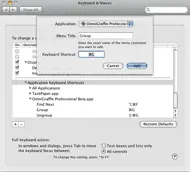
1) Open System Preferences > Keyboard and Mouse settings.

2) Select Keyboard Shortcuts in the control bar. Now scroll down to Application Keyboard Shortcuts.

3) Click the Add button and you'll see the dialog above to add keyboard shortcuts. I've shown you how to re-assign the Group command.

4) Now re-assign the commands for UnGroup and Find as above or using whatever seems intuitive to you.

Now you won't need to know you OG from your AI keyboard shortcuts.