Blog

Schedule and Cost Summary Calculator

· Michael Angeles

About this template

This Cost Estimate and Scheduling spreadsheet provides a lightweight method for learning to estimate time to complete a web design project, and calculating cost for completion. The intended audience is individual freelancers or contractors who need to prepare proposals for potential clients. This may not be an ideal format for the calculation of project team estimates.

The purpose of the document is to teach you to get acquainted with spreadsheets as tools for cost estimation, with the hopes that you will learn to use and modify it to suit your needs. Please note that this is only meant to be learning a tool and must be customized to be useful to you. This is NOT meant to be an out of the box solution.

How it works

This spreadsheet works by breaking your phases into individual tasks. You estimate time to complete tasks and start dates. Estimates are rolled up to show the sum of hours and estimated completion date for all tasks in a phase. Those numbers are then rolled up to show the sum of hours, cost, and completion date for all of the phases. This makes up your cost summary for your proposal.

Calculating time

The spreadsheet calculates time to complete each task based on an estimated low and high number of hours for each task in each phase of work, and calculating the mean or average of those values. This is done so you can enter a range rather than a hard number for safety. The range should be based on your own knowledge of how long it takes to complete each task. Only you will know how long you take to complete these tasks. To better know that number, you may want to work outside the spreadsheet to break each task into sub-tasks that can be estimated in hours.

When a starting date is entered for a task, an estimation of finishing date is calculated based on your value for the number of hours per day you can devote to the project which you enter at the bottom of the spreadsheet, and subtracting any holidays you specify (also at the bottom).

Calculating cost

Cost is calculated by taking the mean hours for a task and multiplying by the rate of pay you select. For this example, I use 3 different rates of pay. You will need to calculate your formulas to the appropriate rate of pay in the Cost column.

Estimating Hours

Coming up with these numbers will depend on the information that you gather in your request for information/statement of work produced with the client. You will llikely do a more broken down estimate of hours based on scope of work. The screen inventory is an example of a document that can be used to break down a task.

Modifying Calculations

Because you may only want to use part of this spreadsheet, e.g. give hard estimates without computing means and using only 1 pay rate, you may wish to edit the formulas included here. The sheet and its formulas are not protected, so you may want to configure your phases and tasks, rates and rate assignments, as well as holidays. You may then protect the document so it can be used for information entry only. Some knowledge of Excel is mandatory for modifying formulas.

Disclaimer

Michael Angeles and Konigi provide no warranty for the use of this spreadsheet. By electing to use this spreadsheet, the user acknowledges that any errors are the sole responsibility of the user, due to data entry, formula creation, calculation, or any use of this spreadsheet on the user's part. Use this spreadsheet at your own risk.
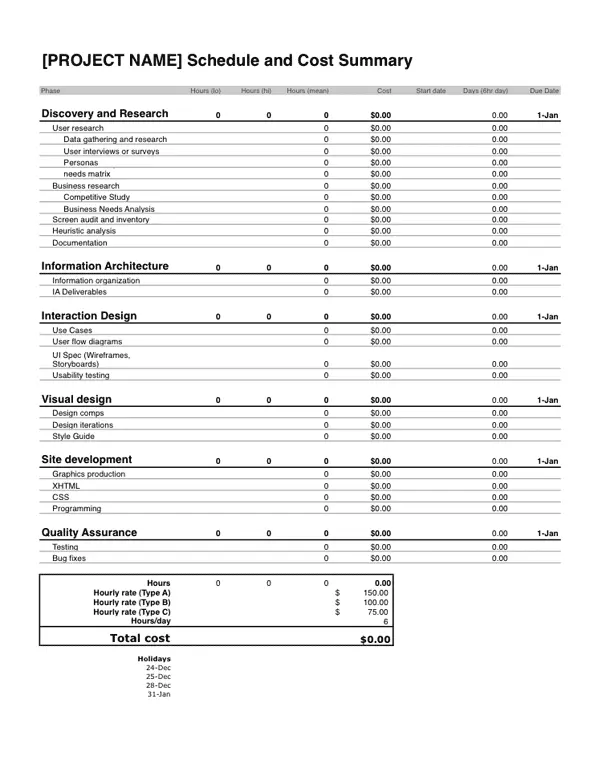
screenshot

Download the Excel Template
This template is free to use, but may not be distributed without permission. If you like it, a donation is appreciated.
How Software is Built: Interview with Liz Danzico

· Michael Angeles

The Scott Swigart and Sean Campbell interview Liz Danico to discuss user experience on the How Software is Built blog. The lengthy conversation covers a wide array of topics including Liz's view of the differences in design process between typical clients with small teams and larger open source projects with communities of participants, design vision and leadership in open source software, and opinions about the acceptance with the direction that open source software has led users in terms of sharing data. Read the full interview.

http://howsoftwareisbuilt.com/2009/03/03/interview-with-liz-danico-user-experience-wordpress/

Plagiarism Vs. Inspiration

· Michael Angeles

The recent Skittles launch, which appropriated Modernista's idea, and the Shepard Fairey law suit, which questions whether or not the artist has a first ammendment right to use images appropriated from an AP photohjournalist, is making me think more and more about the issue of plagiarism vs. inspiration.

I don't know who was involved with the making of the Skittles site, but it reminds me of how BBDO ripped off Spike Jonze's "Full Flared" video for its Skittles commercials. If, for instance, Modernista designed Skittles or Jonze directed the Snickers ad, I wouldn't be bothered. But this just feels like someone is plagiarizing and being lazy. I don't know how a creative agency can be this blatant and not think they're going to get called out for it. What's bothersome in all of this is that credit is not given to the original, permission is not granted I am sure.

I'm a firm believer in finding inspiration from others' work, but only if the concept and design is altered significantly enough that it becomes one's own and only marginally refers to the original. What Fairey does, in my opinion, pales in comparison to what these ad agencies are doing, and it can be debated whether or not his work is too close to the original and falls into the rules for fair use. I think it's pretty close and my opinion on that has been changing pretty regularly on the Fairey issue. What makes the issue sticky is that it is both art and it results in a commercial product. I think it would be less likely to be troublesome if the result was simply some form of communication or a more pure attempt at free speech. But the commercial aspect alters that view of the copy in my opinion.

In any case this is an issue that re-emerges constantly and becomes more and more laborious for me to think about and discuss each time it arises.

Cooper Shows How to Do Low Fi Concept Demos

· Michael Angeles

Cooper Interactive's Commuter Buddy concept video is another great find via Dave Malouf's Engage blog. You might have already seen this one, but as Dave points out, it is a great example of using personas, narrative, and really low fidelity sketches to demonstrate a concept.

The video above uses still photography, super-imposed photos of whiteboard drawings, and voice over narrative to describe the idea for a mobile phone application that helps a commuter to get to his ride on time, and even to remember to get off if he becomes engrossed in an article, for instance. Super idea, but what's really great about this is that how easy and inexpensive it probably was for them to produce this video. Good design doesn't need to be big and costly.

http://www.cooper.com/journal/2009/02/commuter_buddy.html

You may now login with email instead of username

· Michael Angeles

Thanks to @lorenbaxter's suggestion, I've enabled logging in with email rather than username if you prefer. Luckily Drupal's logintoboggan module allows admins to offer this option, as well as offering registration and signup without the roundtrip to email. Sweet. Thanks for making my life easier, Drupal.

This should help ease the experience of finding your file downloads as well if you bought stencils or icons form the store. It also brings me around to re-implementing some of the features I put in in Feb-March last year and then took out, e.g. vote to promote on design and interface submissions. I have a minor redesign planned that hopes to bring that back, but will bring it back for signed in users.

A to Z Indexes

· Michael Angeles

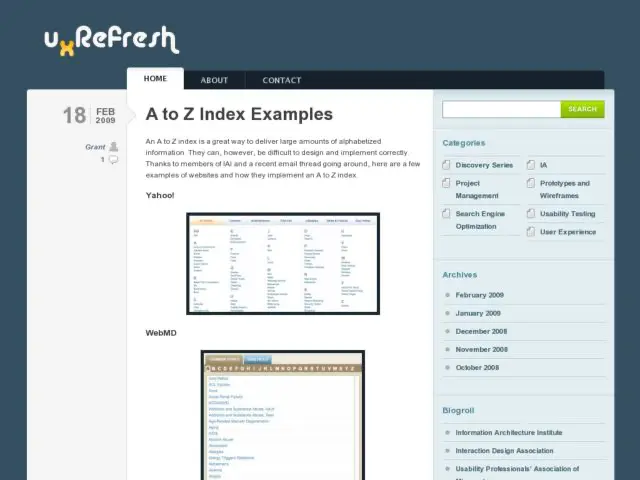
uxRefresh has collected a handful of examples of A-Z indexes of titles on large sites. Also useful might be a look at the article I wrote about KWIC/KWOC/A-Z Site Indexes work I did while at Bell Labs, and for a deeper dive, look at the list of links of indexer-designed examples on the Montague Institute's site. Many of the latter are still valid, but there's some link rot there too. James Kalbach also recently wrote on A-Z indexes, and in particular demonstrated the use of indexes in search auto-completion using Elsevier bibliographic database EMBASE.

Exhaustive A-Z indexes of the variety that indexers produce with relationships among terms are rarely seen on larger sites. This is probably for good reason--search engines are often as effective in most cases and indexes requiring human, subject matter expert involvement are expensive. The kinds of places where these A-Z indexes are to be found are largely in bodies of content with some sort of specialized need, e.g. research databases. It's important to keep in mind, when comparing the above, that there is a difference between simply providing an index of titles of content, and providing an index of terms found in the content. The latter, in my opinion, is where the display of relationships and hierarchy can be most relevant and useful.

http://www.uxrefresh.com/2009/02/a-to-z-index-examples/