Blog

Cafe Work/Sketch Kit

· Michael Angeles
Cafe Work/Sketch Kit

I gave my wife my MacBook to upgrade her from her iBook and got myself a netbook for those times when I'm out and need to wait for my son, and for watching Netflix/Hulu/Slingbox in the house. But I'm also finding that the netbook, a Lenovo Ideapad S10, is really pretty damned sweet for when I want to head out somewhere and do sketches in a cafe. I use it to post to our Traction server while I'm sketching. I just have to remember to put it aside so I can concentrate on getting the sketches done.

The S10 is small, but it sports a 10 inch screen. The only downside I've experienced so far is that the right shift key is positioned one key to the right, out of the normal positioning. They did this to make room for the directional arrows. I'm a touch typist, so I was afraid this would be a deal breaker. It's been about 4 days since I got it, and I'm quite used to the positioning now.

I spent a lot of time researching the netbook options in the past month and this one was up against the new HP Mini 1000, which got rave reviews, but which has one of those awkward side-positioned trackbpad buttons. After trying the Lenovo at a store, and having great experiences with the solid feel of IBM Ideapads for years as a corporate mucky muck, my decision was easily made. The Lenovo gives me greater hard disk storage options, not like the anemic SSDs. I know the tradeoffs, but I felt the HD options were fast enough. I'm not looking for sexy here, just affordable, light, fast enough, reliable enough (I say enough because it's Windows after all), rugged, and usable. It's got get thrown into a bag when I tool around town and hold up to my abuse.

All in all, I'm really very pleased with it. I's only been 4 days and I've taken it out only once, however, so we'll have to reserve final judgement after a month. It gives me what I need for a limited number of use cases. I won't design on it, but I can do a good deal of reading/writing/media viewing with it. I'm using Google Chrome for web browsing, and for my primary application uses: Gmail, Google Docs, and Google Reader. I'm absolutely loving it, by the way. I can bring my Pentax DS Mobile 600 scanner with me to scan my drawings and upload to our server when I'm out sketching.

That's all for now. If you're interested, you can click the Flickr photo above to see notes for what's inside my kit. Here's the contents:

1) Alchemy Goods Haversack, a 6 x 6 x 11 inch shoulder bag made of recycled bicycle inner tubes and a car seat belt. Love this little bag.

2) Notebook cords in a Kensington bag until I can get a strap to wrap them.

3) Glasses in a cheapo case.

4) The Konigi Designer's Notebook prototype, which you should be seeing more of on this site in '09.

5) Konigi wireframe graph paper pad in a vinyl pad holder.

6) Midori Traveler's Notebook with my weekly planner.

7) Lenovo Ideapad S10.

Not pictured is a the Pilot Coleur 0.5 mechanical pencil with 2B lead, and a Pentel Sign Pen.
http://www.flickr.com/photos/jibbajabba/3138042543/

Happy Holidays from Konigi

· Michael Angeles

I just wanted to take a moment to thank everyone who took some time out of their busy days to read Konigi this year, to provide their feedback and commentary, to download my tools, to buy notepads, and to help me keep a dialogue going with you, my new and old design and development friends. This has been a very rewarding first year playing with this blog, and I feel light years away from those years spent doing iaslash.

I wish you all a safe and happy holiday season. I'll be slowing down quite a bit in the next few weeks to spend time with my family, but will return in the next few months with some improvements and surprises on this site.

-Michael

Software Tool Design: Design by Sketching

· Michael Angeles

The second part of Stephen Chambers' series on designing the ANTS Profiler tool, a .NET code profiler, discusses how a team leader challenged a group to really work collaboratively on developing the concept for the tool's interface by taking away computers and requiring that the team work with only paper, whiteboards, pencils, and markers.

James, the team leader had just read Bill Buxton's Sketching the User Experience and wanted to try to get his engineers to rally around the idea that everyone can participate in this ideation phase, and no one needed any specific skill to propose and sketch ideas. After some initial discomfort, a few people got the ball rolling, and then as the ideas started flowing, constraints and possibilities were clarified, revelations ensued, and useful design directions manifested themselves.

Stephen writes that the 2 main things he took away from the exercise were:

  1. It’s easy to generate and explore new ideas when everyone is sitting around a table with a pencil and sketchbook to hand.
  2. You don’t have to second guess what someone is thinking. We often just said “Don’t try and tell me – show me.” Two minutes later you had the idea on paper, concrete and unambiguous.

This is a wonderful example of how to get everyone (especially engineers!) on your team involved in concrete idea generation. There's no need to fear failure or criticism of ideas because sketches are disposable, but by having the ideas shown rather than just discussed, concepts become inherently clear rather and can be quickly refined or discarded with much less lost time when compared to first doing the work in software. The method used here might be a little extreme--taking all the computers out of the room for the duration of the exercise--but the benefits are clear, given the observations in Stephen's telling of the results.

http://www.simple-talk.com/dotnet/.net-tools/software-tool-design-design-by-sketching/

Growl-Like Alerts in Web Pages

· Michael Angeles

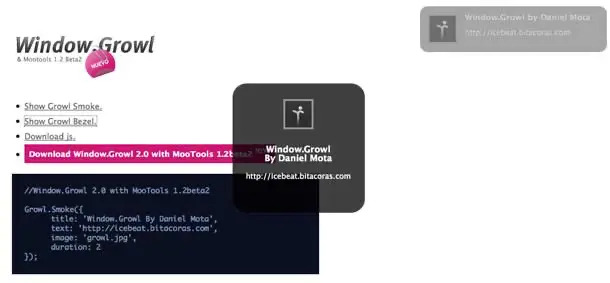
I just came across two Growl-like alert plugins that should be of interest to HTML prototypers. Growl is a Mac OS X application that functions like a service that other applications can use to show unobtrusive messages in the monitor when things happen on the system.

These javascript plugins work for the Moo Tools or JQuery libraries to provide small in-page layers in a corner or center of the page to do such things as show AJAX alerts for new content updates, e.g. show when new articles posted as iminlikewithyou does, or show changes in page state when someone is editing a wiki page perhaps.

The screenshot above shows the Window Growl plugin with 2 different types of messages in view.

http://stanlemon.net/projects/jgrowl.html

undrln

· Michael Angeles

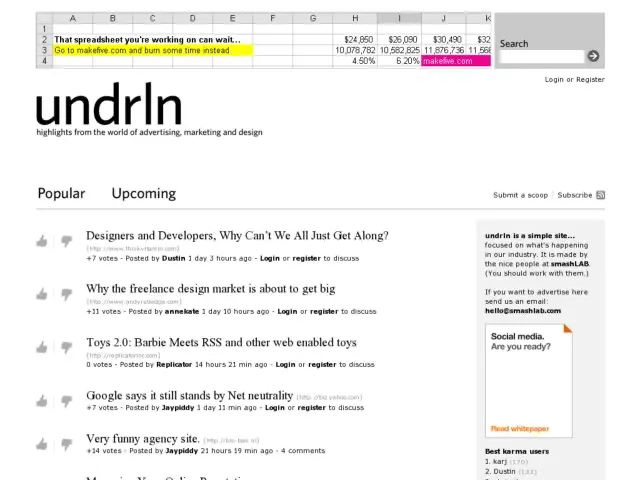
underln is a really simple vote to promote site by smashLAB to scoop any topic or site related to the fields of advertising, marketing, and design. Only 2 inputs: title and URL, and only Title is required.

http://www.undrln.com/

scribbles, incredibly simple drawing app for Mac

· Michael Angeles

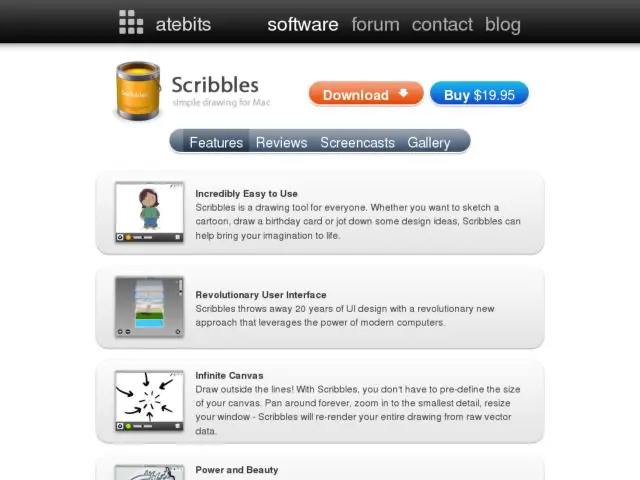
Scribbles is perhaps the simplest drawing program I've ever tried. The app, created by atebits, gives you 4 tools: brush, move, pan, and zoom. There are 12 brush styles, a color picker, a big slider for brush size, and a layer manager.

It looks deceptively simple on the surface, but when you explore a bit, you'll find some really interesting functionalities that even the advanced Mac freehand drawing tools like Sketchbook and ArtRage don't do well. One is the tracing paper mode, which gives you a transparent canvas so you can position the window over anything on screen. The other is the infinite canvas, which lets you zoom out infinitely to widen canvas by just dragging a magnifying glass cursor. It's pretty wild, and you kind of get a sense of scale of your zoomed canvas when grids are on.

Seems like kind of a fun toy, but I'm sure you could do a lot more with this if you got creative.

http://www.atebits.com/software/scribbles/

Wireframing Experiences and Applications with Flash Catalyst

· Michael Angeles

Peter Flynn gives a demo of wireframing in Adobe Flash Catalyst, aka Thermo. Every online demo I've seen of this product looks more and more exciting, and this is truly going to give Mac users a way to do easy interactive prototypes as our PC brothers and sisters can do with tools like Axure. I fully expect to be using this thing when it gets out of Preview release. It's only slightly ironic that his first 5 minutes are talk about how wireframes are by definition, low fidelity, given my last post. :)

http://tv.adobe.com/#vi+f15384v1003

Fear of the High Fidelity Wireframe

· Michael Angeles

In Twitter today, I posted a message that I need to resist putting rounded corners on boxes in wireframes. Then I got a few replies essentially saying that stylized elements shouldn't be in wireframes. Context is everything. Taken out of context, it is very difficult to possibly critique a specific design technique without knowing the how and why you're using it. Because of that 140 character constraint in Twitter, I didn't really explain that this rounded corner example came from my hybrid high-fidelity wireframing and visual design document I was working on.

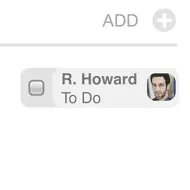
The above is an element in a wireframe. It's for a special kind of tag in Traction, the product I've been working on. They're for todo tags actually, and the element also doubles as a checkbox. If you click the checkbox, the To Do becomes a Done tag.

I'm only posting this entry now so people understand just what the hell I'm talking about in Twitter, and get the bigger picture with regard to what I've been playing at, with going from sketches to UI specs, because very often I skip the rough wireframe stage these days, and go right to design comp-quality elements in UI specs.

I wireframe fast. Faster than I work in Illustrator or Photoshop. I also do all of our XHTML/CSS. But it's still a hell of a lot faster for me to illustrate something in OmniGraffle. That's its purpose after all--it's a drawing program. It's for illustrating. Maybe it's static and it doesn't illustrate everything well, but when I need interactivity, then I do it some other way. But there are times when I find it does a hell of a job at illustrating visual design too.

My point is that there is a place for doing high fidelity in wireframes. The outie/innie distinction is good to point out here. In my situation, HiFi serves a purpose because I'm the one who goes from pencil sketch to implementation just short of hooking up the back end system functionality and AJAX. There are parts we do that go from sketch to implementation, or from discussion to implementation. But there are definitely parts where I do a HiFi wireframe because it's a more efficient path. 99% of the time, I'm not specifying/presenting to communicate an idea to a customer/client, I'm creating to both test out an idea with a design/dev team and to prep the way for graphic production on a visual design that's already been approved.

This discussion may seem out of left field, but it's something I do pretty regularly actually--go from Lo Fi at the onset of a project, to doing Hi Fi when visual design is there. So what's your take. Do you have a similar experience or treat wireframes differently than the majority of IA/IXD pros out there?